

Your key fob just died mid-parking lot. You’re jabbing the button like it owes you money, and nothing’s happening. Before you panic or drop $200 at the dealership, take a breath—how to replace key fob battery is one of the easiest fixes you can do yourself in about two minutes flat. This guide walks you through the entire process, from identifying the right battery to avoiding the common mistakes that’ll have you hunting for a lost spring across your driveway.
Identify Your Battery Type
The first step in learning how to replace key fob battery is figuring out what battery your specific fob needs. This isn’t a one-size-fits-all situation. Most car key fobs use coin-cell batteries—those flat, round batteries that look like tiny metal pancakes. The most common types are CR2032, CR2025, and CR2016. The numbers matter because they represent the battery’s diameter and thickness.
Here’s the real talk: you can find this information three ways. First, check your owner’s manual—it’s usually buried in there somewhere. Second, open the fob itself and look at the battery compartment or the old battery if it’s still there. The battery type is stamped right on it. Third, if you’re stuck, take a photo of your key fob and bring it to any pharmacy or electronics store. They can identify it in seconds.
Don’t guess. Putting the wrong battery in your fob won’t damage it, but it also won’t work, and you’ll waste time and money. Plus, some batteries fit physically but have different voltage outputs, which can cause issues with your car’s receiver.
Gather Your Tools
Here’s the beautiful part: you don’t need much. In fact, you might already have everything sitting in a junk drawer somewhere.
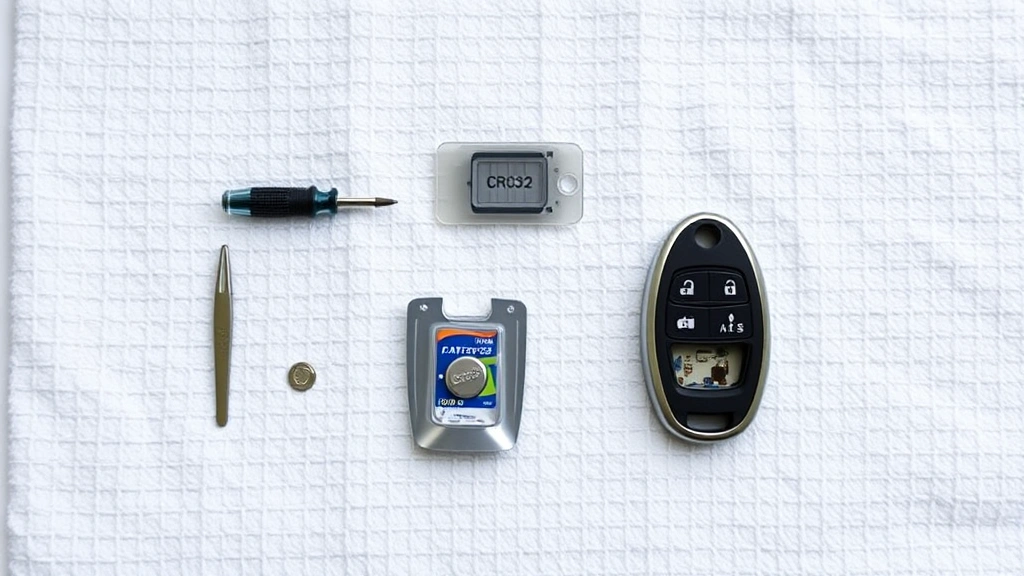
- The correct battery type (CR2032, CR2025, etc.)—grab two if you’re paranoid, which is smart
- A flathead screwdriver (small, like a jeweler’s screwdriver)—or a butter knife, coin, or even a guitar pick in a pinch
- A clean, flat work surface—your kitchen table is fine, but a towel underneath helps catch rolling parts
- Optional: tweezers—helpful if you’ve got shaky hands or small fingers
That’s it. You don’t need a special key fob battery replacement kit, though they exist and cost like $15. Save your money.
Pro tip: work over a towel or small tray. Key fob springs are tiny and love to disappear. I’ve spent more time hunting for a lost spring than actually replacing the battery. It’s not worth it.
How to Open Your Key Fob Safely
This is where most people either succeed or accidentally snap their fob in half. The key is patience and gentle pressure—not brute force.
Most key fobs have a seam running around the edge. Look closely. You’re looking for a small groove or line where the plastic halves meet. Some fobs have a dedicated slot for a flathead screwdriver. If you see one, that’s your entry point. If not, the seam itself is where you’ll work.
- Insert your flathead screwdriver into the groove or seam. Go slow.
- Apply gentle, steady pressure and twist slightly. Think of it like opening a paint can—you’re creating a small gap, not prying it open like a crowbar.
- Once you’ve got a tiny gap, you can often pop the halves apart by hand or use your fingers to pry gently.
- Work around the entire fob if needed. Some fobs have multiple snap points.
If your fob is being stubborn, try running it under warm water for 30 seconds. Sometimes the plastic shrinks slightly, and warmth helps. Dry it completely before opening.
Safety Warning: If you feel significant resistance or the plastic is starting to crack, stop. You might have a different design. Check YouTube for your specific car model and year—seeing it in action beats guessing.
Remove the Old Battery
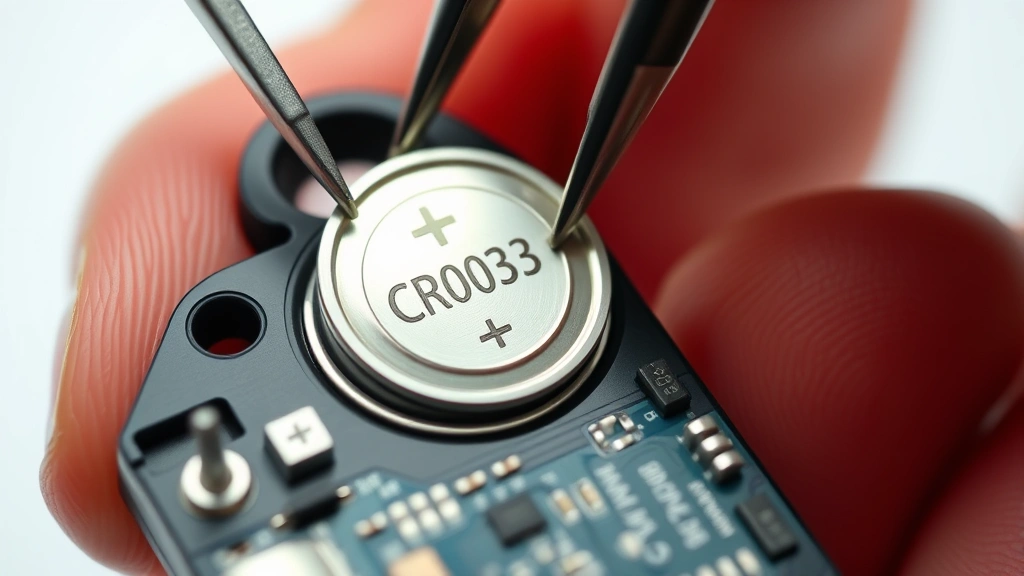
Once your fob is open, you’ll see the battery sitting in a small compartment, usually with a metal contact spring on one side. The battery might be held in by a tiny clip or just sitting loose.
- Note the orientation—which side is facing up? The positive side (marked with a +) usually faces up toward the circuit board. Take a mental note or snap a quick photo.
- If there’s a clip, gently lift it away from the battery. Don’t yank it; these clips break easily.
- Slide or lift the old battery out. Use tweezers if it’s tight, or just your fingernail if you’re careful.
- Check the compartment for any corrosion (green or white crusty stuff). If you see it, gently wipe it with a dry cloth or a cotton swab. Corrosion blocks electrical contact and is why your fob died in the first place.
If the battery is corroded, your fob might not work even with a fresh battery until you clean the contacts. Use a pencil eraser or a dry cloth to gently rub the metal contacts inside the compartment until they shine.
Install the New Battery Correctly
This is where orientation matters. Coin-cell batteries have a positive side and a negative side. The positive side is usually the flat top (marked with a +), and the negative side is the bottom.
- Check your new battery before touching it. Don’t touch the flat sides with your bare fingers—oils can interfere with contact. Use a tissue or your sleeve.
- Orient the battery the same way the old one was. Usually, positive side up.
- Slide it into the compartment gently. It should sit flat without any wobbling.
- If there’s a clip, secure it over the battery. It should hold the battery snugly but not be so tight that you’re forcing it.
Double-check the orientation. This is the number one reason people’s key fobs don’t work after a battery replacement. Positive side up, 99% of the time.
Reassemble and Test
Now you’re almost done learning how to replace key fob battery the right way.
- Carefully snap the two halves back together. Align them so the seams match up. You should hear a satisfying click or feel them seat together. Don’t force it—if it’s not aligning, twist slightly until it does.
- Press down gently on all edges to make sure everything is seated. Some fobs have multiple snap points around the perimeter.
- Test the buttons. Walk to your car and try unlocking it. Try the trunk button if you have one. Try the panic button (away from your car, please).
If it works, congratulations. You just saved yourself $50-$200 in dealership fees. If it doesn’t, don’t panic. See the troubleshooting section below.
Pro Tip: If you replaced the battery in your car’s key fob, you might also need to reprogram it. Some cars reprogram automatically, but others require a specific sequence. Check your owner’s manual or search for your specific model. It’s usually a simple process involving turning the key in the ignition a few times.
Troubleshooting When It Still Doesn’t Work
So you followed every step, and your key fob is still dead. Here’s what to check.
Battery orientation is wrong. This is the most common culprit. Open it back up and flip the battery. Positive side should face the circuit board (usually up). Try again.
Battery contacts are corroded. If you didn’t clean the contacts earlier, do it now. Use a pencil eraser, a dry cloth, or even a small piece of fine-grit sandpaper to gently rub the metal contacts until they shine. Corrosion acts like an insulator and blocks the electrical connection. This is especially common if your fob is old or was exposed to moisture.
You bought the wrong battery type. Double-check the battery you installed against what the fob actually needs. CR2032 and CR2025 look similar but aren’t interchangeable. If you’re unsure, pop it back out and compare it to the packaging or check online for your car model.
The battery is defective. It happens. Grab the backup battery you bought (or run back to the store) and try again. Batteries sit on shelves for years sometimes.
The fob itself is damaged. If the circuit board is cracked, the buttons are broken, or water got inside, a new battery won’t help. You’ll need a replacement fob. Check Family Handyman for guides on finding affordable replacement fobs for your car.
Your car’s receiver needs reprogramming. Some vehicles require you to reprogram the fob after a battery change, especially if the battery died completely. Consult your owner’s manual for the reprogramming sequence, which usually involves turning the key in the ignition or pressing buttons in a specific pattern. It’s typically a 30-second process.
If none of this works, your key fob might have a deeper issue. Before spending money on a replacement, check This Old House or your car manufacturer’s website for model-specific troubleshooting guides.
Frequently Asked Questions
How often should I replace my key fob battery?
– Most key fob batteries last 3-4 years with normal use. Some last longer if you don’t use the fob constantly. You’ll know it’s dying when the range decreases (you have to be closer to your car) or the buttons become unresponsive. There’s no set schedule—just replace it when it stops working.
Can I use a different battery type if I can’t find the exact one?
– Not really. While CR2032 and CR2025 look similar, they have different thicknesses and voltage characteristics. Using the wrong type might not work at all, or it could cause intermittent issues. Spend two minutes finding the right battery. It’s worth it.
Is it safe to replace a key fob battery myself?
– Absolutely. Key fob batteries are low-voltage, low-power components. There’s no risk of electric shock or damage to your car. The only risk is breaking the plastic casing if you’re too aggressive opening it, but that’s on you, not the battery.
What should I do with the old battery?
– Most coin-cell batteries can be recycled. Check the EPA’s recycling database for drop-off locations near you. Many pharmacies and electronics stores (Best Buy, Batteries Plus) also accept used batteries. Don’t throw them in the trash—they contain materials that shouldn’t end up in landfills.
My key fob still works but the range is decreasing. Do I need a new battery?
– Yes, that’s a classic sign of a dying battery. The fob still has enough juice to work at close range, but it can’t transmit far enough to reach your car from across a parking lot. Replace the battery before it dies completely.
Can moisture damage my key fob after I replace the battery?
– Key fobs aren’t waterproof, but they’re usually water-resistant enough to handle occasional rain or a spill. If your fob gets soaked, let it dry completely (24 hours) before using it. If it stops working after water exposure, the circuit board might be damaged, not the battery. In that case, you’ll need a replacement fob.
Do I need to reprogram my key fob after changing the battery?
– Most modern cars reprogram automatically when you install a new battery and press a button. Some older vehicles require manual reprogramming. Check your owner’s manual or search for your specific car model online. The process, if needed, usually takes less than a minute.
What’s the difference between a CR2032 and a CR2025 battery?
– The numbers represent size. CR2032 is 20mm in diameter and 3.2mm thick. CR2025 is 20mm in diameter but only 2.5mm thick. They fit different compartments. Using the wrong one might not fit or might not make proper contact. Always match the exact type.
Can I buy key fob batteries at any store?
– Yes. Pharmacies, grocery stores, electronics retailers, hardware stores, and online retailers all carry coin-cell batteries. They’re cheap (usually $2-$5) and widely available. Don’t overpay at a dealership.
My key fob battery died, and now my car won’t start. Is that normal?
– No. A dead key fob battery shouldn’t prevent your car from starting. You can usually start the car by pressing the fob against the start button or by using a physical key. If your car won’t start, the issue is something else—a dead car battery, a fuel problem, or an electrical issue. See a mechanic.


