
Learning how to clean TV screens properly is one of those tasks that seems simple until you realize you’re about to wreck a $500+ investment with the wrong cloth or liquid. I’ve been there—grabbed a paper towel, sprayed some Windex, and nearly had a heart attack when I saw the damage. The good news? Cleaning your TV safely takes about 10 minutes and requires almost nothing special. Let me walk you through exactly what works, what doesn’t, and why.
Table of Contents
Why Regular Cleaning Matters
Your TV screen collects dust like a magnet. That dust layer doesn’t just look bad—it actually reduces picture quality by diffusing light and can trap heat against the display. Over months, accumulated dust and debris can impact the lifespan of your panel. The screen is also a fingerprint magnet if you have kids or pets in the house. Regular light cleaning every 2-4 weeks keeps your display looking sharp and functioning properly. Think of it like maintaining any other piece of equipment—a little prevention beats major problems later.
What You Actually Need
Here’s the beautiful part: you don’t need specialty products. Grab these items and you’re ready to go:
- Microfiber cloth (the real MVP—non-abrasive and lint-free)
- Distilled water (tap water leaves mineral deposits)
- Optional: 50/50 distilled water and white vinegar (for tougher marks)
- Soft-bristle brush (optional, for vents and crevices)
That’s it. You don’t need screen cleaning sprays, alcohol-based products, or anything marketed specifically for TVs. Those products often contain harsh chemicals that damage modern LCD and LED panels. Your TV manufacturer probably recommends distilled water and microfiber—because it works and won’t void your warranty.
Power Down Your TV First
This is non-negotiable. Turn off your TV completely and unplug it from the wall. Wait 5 minutes for the screen to cool down and discharge any residual static electricity. A warm screen is more sensitive to liquid and can be damaged by moisture when powered on. Plus, the static electricity can actually attract dust particles more aggressively. Think of this as your safety step—it protects both you and your investment. Once it’s cool and unplugged, you’re ready to proceed.
The Dust Removal Step
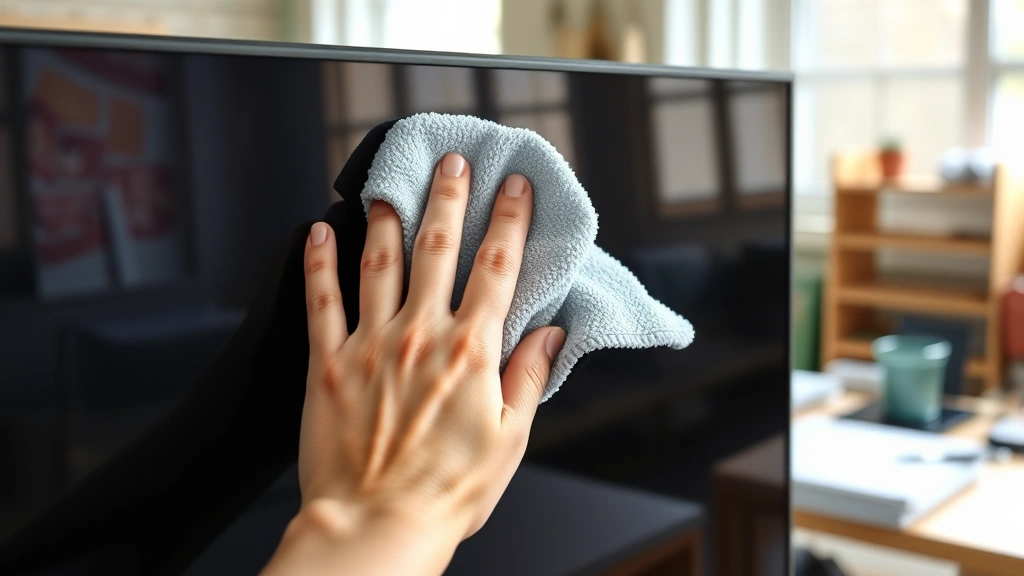
Start with a dry microfiber cloth. Use gentle circular motions to wipe away loose dust and particles. Don’t press hard—let the cloth do the work. Many TV screens can be cleaned completely with just this dry cloth step. If you have a soft-bristle brush (like an old makeup brush), gently brush the vents and bezels where dust accumulates. The key word here is gentle—you’re not scrubbing a kitchen counter. Think of it as caressing the screen, not cleaning it. This initial dry pass removes most of what you need to tackle and prevents you from grinding dust particles into the screen with moisture.
Spot Cleaning Stubborn Marks
For fingerprints or dried-on spots, dampen (not soak) your microfiber cloth with distilled water. The cloth should feel slightly damp, not wet. Wipe the affected area gently using the same circular motions. If water alone doesn’t work, try the 50/50 distilled water and white vinegar solution—vinegar cuts through oils and dried residue without damaging the panel. Apply the solution to your cloth first, never directly to the screen. One pass is usually enough; if you need a second pass, let the cloth dry slightly between applications. For stubborn marks like dried-on sap or adhesive residue, patience beats pressure every single time.
Don’t Forget the Frame
While you’re at it, clean the plastic frame and bezel around your screen. This area collects dust, pet hair, and debris that can migrate toward the screen over time. Use the same damp microfiber cloth on the frame, and don’t hesitate to be slightly more aggressive here since the bezel can handle more pressure than the actual display panel. If you have a remote control nearby (like when you’re reprogramming your Firestick remote), wipe that down too—remotes are dust magnets and rarely get cleaned. A quick wipe of the remote while you’re at it makes the whole entertainment setup feel fresher.
Proper Drying Technique
After you’ve cleaned with a damp cloth, use a dry section of your microfiber cloth to remove any remaining moisture. This is important because water left on the screen can seep into the bezels and potentially damage internal components. Wipe gently until the screen looks completely dry and streak-free. If you see any streaks, use a clean dry cloth to buff them out. The microfiber material is specifically designed to dry screens without leaving lint or residue—that’s why it’s worth having one dedicated to your TV. Let the screen air-dry for another 2-3 minutes before plugging the TV back in and powering it on.
What NOT to Do
This is where I’ll save you from expensive mistakes. Never use paper towels, tissues, or toilet paper—they’re abrasive and will scratch your screen. Don’t use Windex, alcohol, acetone, or any harsh chemical cleaners. These dissolve the coatings on modern screens and can cause permanent damage. Never spray liquid directly onto the screen—always apply it to your cloth first. Don’t use excessive pressure or circular motions like you’re polishing a car. Avoid cleaning products designed for other surfaces, even if they seem gentle. And please, never attempt to clean the interior vents or take apart your TV—that’s a warranty violation and a safety hazard. Stick to external surfaces only. When in doubt, check your TV’s manual for the manufacturer’s specific cleaning recommendations.
Maintenance Schedule
Keep your TV looking fresh with a simple schedule. Every 2-4 weeks, do a quick dry-cloth dust removal. This takes 2 minutes and prevents dust buildup. Every 1-2 months, do a more thorough cleaning with the damp cloth method if needed. If you have pets or live in a dusty area, bump up the frequency slightly. In humid climates, be extra careful about moisture and make sure your TV is in a well-ventilated area. If your TV gets heavy use or sits in a high-traffic area, you might clean it more often. Just remember that less frequent but consistent cleaning beats occasional aggressive scrubbing. Think of it like brushing your teeth—regular maintenance prevents major problems.
Frequently Asked Questions
Can I use Lysol wipes on my TV screen?
Absolutely not. Lysol and similar disinfectant wipes contain alcohol and harsh chemicals that damage LCD and LED coatings. Stick to distilled water and microfiber cloth only. If you’re concerned about germs on your remote or frame, Lysol wipes are fine for those areas—just keep them away from the actual display panel.
What if my TV screen has a protective coating?
Many modern TVs have anti-glare or oleophobic coatings on the screen. These coatings are sensitive to harsh chemicals and excessive moisture. Distilled water and microfiber cloth are actually the safest choice for coated screens. Your TV manual will specify if your model has a special coating and any unique cleaning requirements.
Is it okay to clean my TV while it’s on?
No. Always power down and unplug your TV before cleaning. Moisture and powered electronics don’t mix, and a warm screen is more vulnerable to damage. Plus, you can’t see what you’re actually cleaning when the screen is displaying an image.
How often should I clean my TV screen?
For most people, a light dry-cloth cleaning every 2-4 weeks is sufficient. If you have pets, kids, or live in a dusty environment, clean more frequently. A thorough damp-cloth cleaning every 1-2 months keeps your display in great condition without overdoing it.
Can I use eyeglass cleaning solution on my TV?
Most eyeglass cleaners are formulated for glass lenses and contain chemicals that can damage TV coatings. Distilled water is the safer choice. Some eyeglass solutions might work, but why risk it when distilled water costs pennies and is guaranteed safe?
What about cleaning the TV stand or mounting bracket?
Go ahead and use standard household cleaners on the stand, mounting bracket, and cables. Just make absolutely sure nothing drips onto the screen or internal vents. Use a cloth rather than spraying directly, and keep liquids away from any electrical connections.
My TV has dead pixels—will cleaning help?
No. Dead pixels are a hardware issue, not a dirt problem. Cleaning won’t fix them. If your TV is under warranty and has dead pixels, contact the manufacturer about a replacement or repair. Cleaning will help with dust and dirt, but it won’t revive dead pixels.
Can I use newspaper to clean my TV?
No. Newspaper is abrasive and will scratch your screen. The ink can also transfer onto the display. Stick with microfiber cloth designed for screens—it’s the only cloth you should use on your TV display.
The Bottom Line
How to clean TV screens comes down to three principles: power down first, use only distilled water and microfiber cloth, and be gentle. You don’t need expensive products or complicated techniques. A 10-minute cleaning session every few weeks keeps your display looking sharp and functioning properly. The investment in a quality microfiber cloth pays for itself in peace of mind—you know you’re not damaging your TV while maintaining it. If you’re maintaining other electronics around your home, you might also want to learn about how to clean battery corrosion on remotes and devices, or how to clean silver at home if you have decorative items collecting tarnish. The same principle applies to all maintenance tasks: use the right tools, be gentle, and stay consistent. Your TV will thank you with years of crisp, clear picture quality.
For official manufacturer guidance, check your TV’s manual or visit your brand’s support website. Most manufacturers provide specific cleaning recommendations for their panels.


