
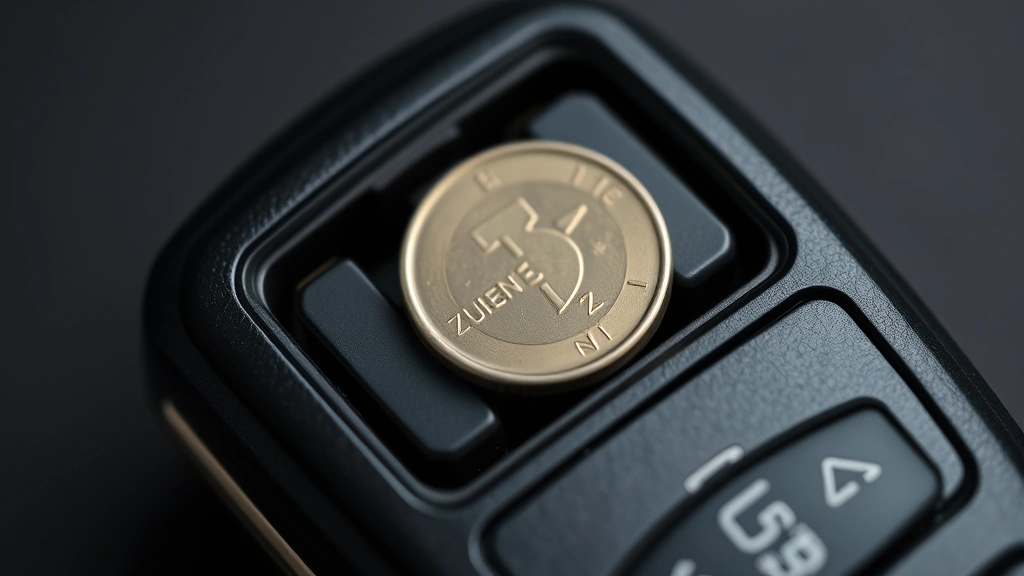
Your key fob just died. You’re standing in the parking lot, pressing the button over and over, and nothing happens. Before you panic and call a dealer (who’ll charge you $50-$150 for a five-minute job), here’s the truth: how to change key fob battery is genuinely one of the easiest car maintenance tasks you can do yourself. Most key fobs take less than two minutes to crack open and refresh. No special tools. No expertise required. Just a little know-how and the right battery type.
I’ve helped hundreds of people through this exact situation, and I can tell you—the hardest part is usually just finding the seam on your fob. Once you know where to look, you’re golden.
Identify Your Key Fob Battery Type
Before you buy anything, you need to know what battery your fob uses. The most common types are CR2032, CR2025, and CR2016. These are all coin-cell batteries—flat, round, and roughly the size of a dime or quarter.
Here’s how to figure out which one you need:
- Check your owner’s manual. Seriously, this is the fastest way. Your manual will list the exact battery model.
- Look at the fob itself. Sometimes there’s a tiny marking on the back or inside that tells you the battery type.
- Call your dealership. Give them your car’s year, make, and model. They’ll tell you instantly.
- Take an educated guess based on your car’s age. Most modern cars (2005 and newer) use CR2032. Older vehicles might use CR2025.
When in doubt, CR2032 is your safest bet—it’s the industry standard and fits about 80% of key fobs out there. You can grab a pack of them at any pharmacy, grocery store, or online for $3-$8. Way cheaper than a dealership visit.
Pro Tip: Buy a two-pack or multi-pack while you’re at it. Key fob batteries die unpredictably, and having a spare in your junk drawer is worth its weight in peace of mind. Plus, the per-unit cost drops significantly when you buy in bulk.
Gather Your Tools (Spoiler: You Probably Have Them)
This is where it gets embarrassingly simple. You don’t need a fancy toolkit. Here’s what you actually need:
- A coin (penny, nickel, or dime). This is your primary tool. The edge fits perfectly into the seam of most key fobs.
- A plastic spoon or butter knife (optional). If your fob has a really tight seam, a plastic tool is gentler on the plastic than a coin.
- A small flat-head screwdriver (optional). Some fobs have tiny screws instead of a clip mechanism.
- Your new battery. Obviously.
- A clean, well-lit workspace. Your kitchen table works fine. A small parts tray or piece of tape helps you keep track of tiny screws.
That’s it. No soldering. No electronics degree. No special equipment. If you have a coin and a new battery, you’re ready to go.
How to Open Your Key Fob Safely
This is the step that makes people nervous, but it’s actually harder to mess up than you’d think. Key fobs are designed to come apart.
Step 1: Locate the seam. Look at your fob carefully. There’s a line running around the edge where the two halves meet. This is your target. Some fobs have this seam on the side; others have it on the back. Run your fingernail along it to feel where it is.
Step 2: Insert your coin gently. Take your coin and slide it into the seam. Don’t jam it in like you’re angry at the fob. Gentle, steady pressure is your friend here. You’re looking for the tiny clip or notch that holds the two halves together.
Step 3: Twist slowly. Once your coin is seated in the seam, twist it gently—think of it like opening a paint can, but with way less force. You’ll feel resistance, and then suddenly, you’ll feel a little give. That’s the clip releasing.
Step 4: Separate the halves. Once the clip releases, you can usually pull the two halves apart with your fingers. If it’s still tight, work your coin around the seam a bit more. Don’t force it—forcing it is how you crack the plastic.
According to Family Handyman, the key to avoiding damage is patience. Most key fob failures happen because people get impatient and apply too much force.
Safety Warning: If your fob has visible screws, you’ll need a small flat-head screwdriver instead of a coin. Gently remove each screw and place them in a small container so you don’t lose them. This is especially common on older key fobs or high-end luxury vehicles.
Remove the Old Battery

Once your fob is open, you’ll see the battery sitting in a small plastic holder. It’s usually silver and shiny, about the size of a large button.
Step 1: Note the orientation. Before you touch anything, look at which side is facing up. The battery has a positive side (marked with a +) and a negative side (marked with a −). You need to put the new one in the same way. Take a mental note or snap a quick phone photo.
Step 2: Gently remove the old battery. Use your fingernail or a plastic spoon to gently pry the battery up from its holder. It should come out easily. If it’s stuck, don’t panic—just apply a tiny bit more pressure. These batteries aren’t glued in; they’re just sitting in a spring-loaded holder.
Step 3: Dispose of it properly. Old batteries shouldn’t go in the trash. Take them to a battery recycling program. Most retailers that sell batteries (Best Buy, Walmart, etc.) have free recycling bins at the customer service desk. It’s quick and free.
Real talk: I’ve seen people get frustrated here because they expect the battery to pop out like a spring. It won’t. It’ll just slide out. If you’re pulling hard and it’s not moving, you’re probably pulling at the wrong angle. Adjust your approach and try again.
Install the New Battery
This is the moment of truth, and it’s almost impossible to mess up.
Step 1: Orient your new battery correctly. Remember that photo you took (or the mental note)? Use it now. The positive side (+) should face the same direction as the old battery’s positive side. This matters. If you install it backwards, your fob won’t work.
Step 2: Place the battery in the holder. Gently set your new battery into the plastic holder. It should sit flat and feel secure. You don’t need to press hard—just let gravity do the work.
Step 3: Double-check the orientation one more time. Seriously, take five seconds and verify. Backwards batteries are the #1 reason people think their fob is broken when it’s actually just installed wrong.
This is genuinely it for the battery part. If you’re waiting for something complicated to happen, it’s not. This is the easiest step in the whole process.
Reassemble and Test Your Fob
Step 1: Close the fob. Align the two halves and press them together firmly. You should hear or feel a little click as the clip snaps back into place. If you don’t hear a click, the halves might not be fully seated. Try again, making sure they’re perfectly aligned.
Step 2: Test the buttons. Press your lock and unlock buttons a few times. Your car should respond immediately. If your windows are down or you’re in a safe place, test the panic button too.
Step 3: Test from different distances. Walk a few feet away and try locking/unlocking from across the parking lot. This tells you the battery has good charge and the fob’s transmitter is working properly.
If your fob works, congratulations—you just saved yourself $50-$150 and learned something useful. If it doesn’t work, don’t worry. We’ll troubleshoot below.
Pro Tip: While you’ve got the fob open, take a moment to clean the inside. Over time, dust and debris can accumulate inside the case and cause intermittent button issues. A dry cloth or a tiny bit of isopropyl alcohol on a cotton swab works great. Let it dry completely before reassembling.
What to Do If It Still Doesn’t Work
Your fob is reassembled, but it’s still dead. Don’t panic. Here are the most common culprits:
You installed the battery backwards. This is the #1 reason. Open the fob again and flip the battery 180 degrees. The positive side should face up (or toward the circuit board, depending on your fob’s design). If you’re unsure, check your owner’s manual or search for your specific fob model online.
The battery is defective. It happens. Batteries can be dead out of the box. Try a different battery from the same pack. If that works, you got a dud—no big deal. Take it back for a refund.
The contacts are dirty. If the metal contacts inside your fob are corroded or dirty, the battery won’t make good contact. Open the fob again and gently clean the metal contacts with a dry cloth or a tiny bit of isopropyl alcohol. Let everything dry completely before reassembling.
Your fob’s circuit board is damaged. This is rare, but if your fob got wet, dropped from a height, or sat in extreme heat, the circuit board might be fried. In this case, you’ll need to replace the entire fob. Your dealership can order a replacement, or you can buy an aftermarket fob online for $20-$80, depending on your car.
You need to reprogram your fob. Some cars require you to reprogram the fob after replacing the battery. Check your owner’s manual for reprogramming instructions. Usually, it’s something like turning the key to the “On” position a few times or holding a button for 10 seconds. Different manufacturers have different processes.
According to This Old House‘s automotive section, the reprogramming step is often overlooked and causes unnecessary frustration. If your fob still doesn’t work after battery replacement, reprogramming is worth trying before you assume the fob is broken.
If none of these steps work, it’s time to call your dealership or a professional locksmith. You’ve done your due diligence, and sometimes hardware just fails. That’s not a reflection on your DIY skills—it’s just how things go sometimes.
Frequently Asked Questions
How often do key fob batteries need to be replaced?
– Most key fob batteries last 3-4 years with normal use. If you use your fob heavily (lots of locking/unlocking), you might need to replace it sooner. Some people get 5+ years out of a single battery. It depends on how often you’re actually pressing the buttons. If your fob suddenly dies after years of reliable service, that’s normal wear and tear.
Can I use a different battery type than what’s recommended?
– Not really. CR2032, CR2025, and CR2016 are all different sizes, and using the wrong one can cause poor contact or damage to your fob’s battery holder. Stick with what your manual recommends. If you’re unsure, CR2032 works for most modern cars, but don’t guess—call your dealership to confirm.
What if my key fob has two batteries?
– Some luxury vehicles and older fobs use two coin-cell batteries. If yours has two, replace both at the same time, even if only one seems dead. They age together, and replacing just one often means you’ll be back here in a few months replacing the other. Plus, you’re already inside the fob—might as well do both while you’re at it.
Is it safe to open my key fob myself, or will I void the warranty?
– Opening your fob to replace the battery is completely safe and won’t void your car’s warranty. Key fob batteries are considered consumables, like light bulbs or windshield wipers. Manufacturers expect you to replace them. The only exception: if your fob is under a separate extended warranty (some dealerships offer this), check the terms. But standard car warranties don’t cover batteries, and replacing one yourself is totally fine.
My fob works sometimes but not always. Is it the battery?
– Intermittent fob issues are usually a sign that the battery is dying. As batteries age, they lose voltage gradually, and sometimes they work and sometimes they don’t—especially if you’re far from your car or the weather is cold. Replace the battery. If the problem persists after replacement, it’s likely a circuit board or button contact issue, and you’ll need a replacement fob.
Can I clean my key fob battery with water?
– No. Use a dry cloth or isopropyl alcohol on a cotton swab. Water can corrode the battery and damage the circuit board. If your fob has been submerged, let it air-dry completely (24+ hours) before opening it. Even then, it might not work. Water damage to electronics is usually permanent.

Why is my new battery draining so fast?
– If your new battery dies within a few weeks, something else is wrong. Either the battery is defective, the fob’s circuit is drawing excessive power (a sign of internal damage), or the battery wasn’t installed correctly. Try a different battery first. If that one dies quickly too, your fob probably needs to be replaced. This is rare, but it happens.
Do I need to reprogram my fob after changing the battery?
– Most modern cars don’t require reprogramming after a simple battery change. However, some vehicles do. Check your owner’s manual. If reprogramming is needed, the process is usually simple—something like turning the key to the “On” position multiple times or holding a button for 10 seconds. Your manual will have exact instructions. If you’re not sure, try your fob first. If it doesn’t work, then check the manual for reprogramming steps.


