
Locked yourself out of the garage? Can’t get your new remote to work? Programming a garage door opener isn’t rocket science, but it’s one of those tasks where a single wrong move can leave you frustrated and stuck outside. The good news: how to program a garage door opener is straightforward once you know the system you’re dealing with. Whether you’ve got a decades-old chain drive or a modern smart opener, this guide walks you through every scenario without the corporate jargon.
Most homeowners think they need a technician. They don’t. You’ve got this—and we’re going to make sure it sticks the first time.
Identify Your Garage Door Opener Model
Before you touch anything, you need to know what you’re working with. This is non-negotiable. Walk into your garage and look up at the ceiling-mounted motor unit. You’re looking for a label or brand name—usually on the side or front of the housing.
The big players in the market are Chamberlain (LiftMaster), Genie, Wayne-Dalton, and Craftsman. Each has slightly different programming sequences, so knowing your brand is step one. If you can’t find a label, check the remote itself—the manufacturer is printed there too.
Once you’ve got the brand, grab your smartphone and search “[Brand Name] garage door opener manual PDF.” Most manufacturers host these online for free. Download it. Print it if you can. This manual is your safety net.
Pro Tip: Take a photo of the model number and any serial information with your phone. If you get stuck, you can reference it quickly without climbing a ladder again.
The age of your opener matters too. Openers installed before 2010 often use simpler rolling code systems, while newer models (post-2015) typically have rolling codes with additional security features. Very old openers (pre-2000) might use fixed codes—less secure, but easier to program in some cases.
Programming a Basic Remote Control
This is where most people start, and it’s the most straightforward scenario. You’ve got a new remote, and you need to teach the opener to recognize it. Here’s the real-world process:
The Standard Learn Button Method
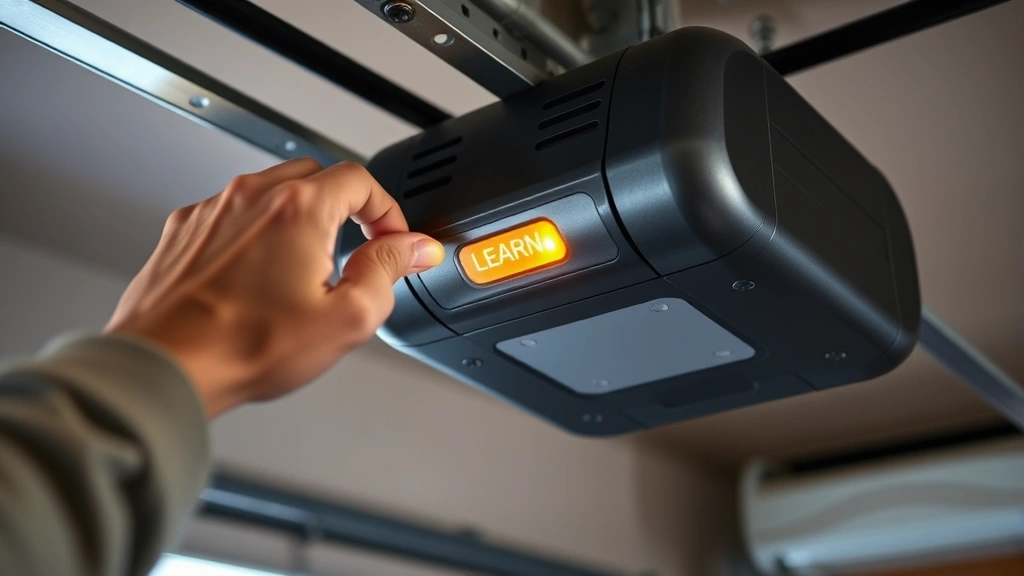
- Locate the Learn button. On the motor unit itself (not the remote), find the Learn button. It’s usually yellow, orange, or red, and labeled clearly. On some models, it’s hidden under a light cover or on the back panel. Check your manual if you can’t spot it immediately.
- Clear the area. Make sure nothing is under the garage door. Seriously. This isn’t paranoia—it’s how people get hurt. The door will move during programming, and you want a clean path.
- Press and release the Learn button. You’ll see a light blink or hear a beep. This puts the opener in “learning mode” for about 30 seconds. This window is tight, so have your remote ready.
- Press the remote button you want to program. Within those 30 seconds, press the button on your new remote that you want to use for the garage door. Press it once, hold for about 2 seconds, then release.
- Listen for confirmation. Most openers will flash the light again or beep twice to confirm programming. Some will cycle the door slightly. If nothing happens, you missed the 30-second window—start over.
- Test it. Step back and press the remote button from a safe distance. The door should open or close smoothly. If it doesn’t respond, repeat the process. Sometimes it takes two attempts.
That’s it for most basic remotes. The whole process takes under five minutes if you’re organized.
Now, here’s where it gets tricky: rolling codes. Most modern openers use a rolling code system, which changes the code every time you press the remote button. This is a security feature—it prevents someone from recording your signal and replaying it to open your door. When you program a new remote, the opener and remote synchronize their rolling code sequence. If your remote gets out of sync (say, you pressed it 50 times in your pocket), you might need to reprogram it or use a resync procedure.
For Chamberlain/LiftMaster openers specifically, there’s often a “quick program” method: press the Learn button once (not hold), then press your remote button within 30 seconds. Different manufacturers have different timings, so your manual is essential here.
Programming Multiple Remotes
You can program up to 4 remotes on most residential openers. Just repeat the Learn button process for each remote. Each remote gets its own button slot, so you can program the “open” button on one remote and the “close” button on another if you want (though that’s weird and not recommended).
Real Talk: If you’re programming a garage door opener for a rental property or a guest house, use different remotes for different people. Don’t share one remote between tenants—it’s a security nightmare. Everyone gets their own, and you can reprogram individually if someone moves out.
Smart Home Integration & WiFi Openers
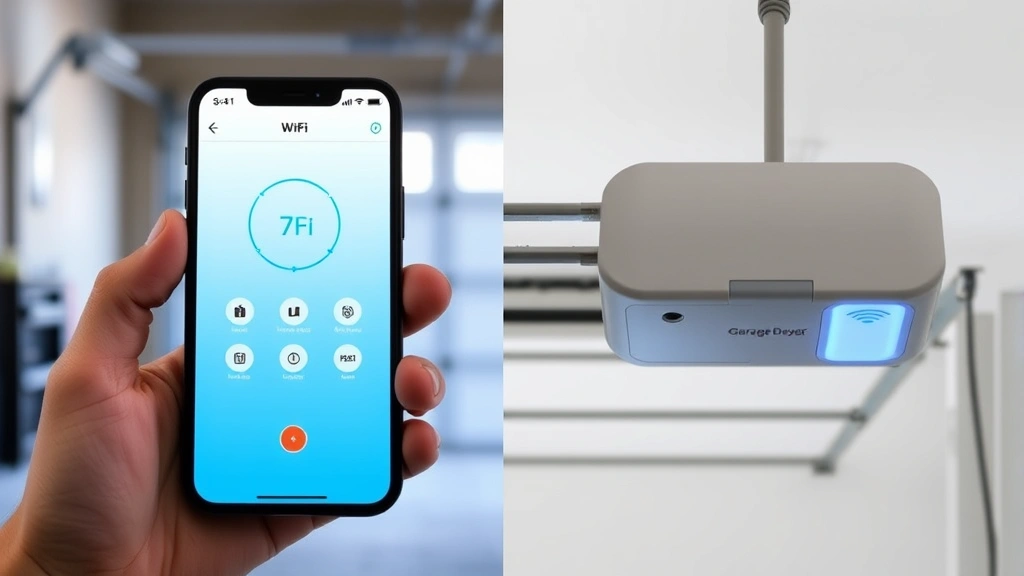
Modern openers like Chamberlain MyQ, Genie Aladdin Connect, and Craftsman Smart Garage Door Openers work differently. They connect to your home WiFi and let you control the door from your phone, set schedules, and get notifications. The physical remote programming is the same, but the smart integration adds a layer.
First, program your physical remote using the Learn button method (see above). Then, for the smart features:
- Download the manufacturer’s app. MyQ, Aladdin, or whatever your opener uses. Create an account—you’ll need this.
- Add your opener to the app. Most apps have an “Add Device” or “Connect Opener” option. You’ll scan a QR code on the motor unit or enter a serial number. The app walks you through it.
- Connect to WiFi. The opener needs to be within range of your 2.4 GHz WiFi network (most openers don’t support 5 GHz yet, frustratingly). Enter your WiFi password in the app, and the opener will connect. This usually takes 2-3 minutes.
- Test remote and app control. Try opening and closing from both your physical remote and the app. There might be a 2-3 second delay on app commands—that’s normal.
If the opener won’t connect to WiFi, check three things: Is your router close enough? Is it 2.4 GHz (not 5 GHz)? Is the password correct? Restart the router and try again. WiFi connectivity is where most people get stuck, but it’s usually just a distance or band issue.
Smart openers also integrate with voice assistants (Alexa, Google Home), but that’s a separate setup process handled through the voice assistant’s app, not the garage door app. Once your opener is in the manufacturer’s app, the voice integration is usually just a few taps.
One thing to note: smart openers add convenience, but they also add complexity. If your WiFi goes down, you can still use the physical remote. If the app glitches, you’re not locked out. The physical remote is your backup—never forget that.
Programming a Keypad Entry System
Keypads are great for guests, contractors, or when you forget your remote (again). They’re usually mounted on the wall inside the garage or on the garage exterior. Programming varies by brand, but the general process is similar.
For Chamberlain/LiftMaster keypads:
- Locate the Program button on the keypad (usually on the back or side).
- Press and hold it for 3-5 seconds until you hear a beep or see a light flash.
- Enter a 4-digit code on the keypad (something you’ll remember, not your birthday).
- Press Enter or the Program button again to confirm.
- Test by entering the code and pressing Enter. The door should move.
For Genie keypads: The process is usually similar, but Genie often requires you to press a specific sequence (like pressing the Program button, then a number, then Program again). Check your manual—Genie’s vary more than Chamberlain’s.
You can typically program 3-4 different codes on a single keypad. If you want to delete a code, there’s usually a “Delete” or “Clear” button sequence—again, your manual is your friend here.
Safety Warning: Don’t use obvious codes like 1234 or 0000. Contractors and service people might guess them. Use something meaningful to you but not obvious—like the last four digits of a phone number you remember or a lucky number.
Keypads are battery-powered, so they’ll need fresh batteries every 1-2 years depending on use. Keep spare batteries on hand. A dead keypad is useless.
Troubleshooting Common Programming Issues
Things don’t always go smoothly. Here are the most common issues and how to fix them:
Remote Won’t Program (No Light Flash or Beep)
The Learn button might not be activating. Try these:
- Press and hold the Learn button for 5-10 seconds instead of just tapping it. Some openers require a longer press.
- Check if there’s a secondary Learn button. Some models have one on the front and one on the back.
- Restart the opener. Unplug it for 30 seconds, plug it back in, and try again. This resets the system.
- Make sure the remote batteries are fresh. A weak battery won’t transmit properly. Pop in new ones and retry.
Remote Programs But Doesn’t Work
The opener “learned” the remote, but it won’t actually open or close the door. This usually means the remote button isn’t sending a strong enough signal.
- Replace the batteries in the remote. This is the most common culprit.
- Stand closer to the opener and try again. If it works from 5 feet away but not from 20 feet, the signal is weak.
- Check if there’s metal interference. Aluminum siding, metal roofs, or electrical panels can block signals. Try moving to a different part of the garage.
- Reprogram the remote. Sometimes it just didn’t sync properly the first time. Go through the Learn button process again.
Door Opens But Won’t Close (Or Vice Versa)
You’ve programmed the remote, but it only does one direction. This usually means you programmed the wrong button, or the opener is stuck in a mode.
- Check your remote. Does it have separate buttons for Open and Close? Make sure you’re pressing the right one.
- If your remote has just one button (standard for most), pressing it should toggle between open and close. If it only opens, the door’s limit switches might be misaligned—that’s a different issue (call a pro for that one).
- Try reprogramming using a different button on the remote if it has multiple buttons available.
WiFi Opener Connected But App Won’t Control It
The opener is online, but the app shows “offline” or won’t respond to commands.
- Check your internet connection. If your phone is on cellular data instead of WiFi, you might have latency issues. Switch to WiFi.
- Restart the app. Close it completely and reopen it. Sometimes the app just needs a refresh.
- Restart the opener. Unplug it for 30 seconds. This clears any connection glitches.
- Check your router’s 2.4 GHz band. Some routers have it disabled by default. Log into your router settings and enable it if needed.
- Ensure the opener is within 30-50 feet of your router. WiFi range varies, but garage door openers are power-hungry devices that need decent signal strength.
Multiple Remotes Interfering With Each Other
You’ve programmed two remotes, but pressing one affects the other’s function. This is rare but happens with older openers or if remotes are very close together.
- Clear all remotes from the opener by pressing the Learn button for 10-15 seconds (some models require this to “factory reset” the learning mode).
- Reprogram each remote one at a time, waiting 30 seconds between each one.
- Store remotes in different locations (car, garage, house) to avoid signal overlap.
For more detailed troubleshooting, check Family Handyman’s garage door opener guide, which covers brand-specific issues in depth.
Safety Considerations & Best Practices
Programming a garage door opener is safe if you follow basic precautions. Here’s what you need to know:
Never Stand Under the Door While Programming
During programming, the door might move unexpectedly. A 400-pound garage door descending on your head is not a learning experience—it’s a trip to the emergency room. Always stand to the side and keep the door’s path clear.
Check the Door’s Safety Features
Before you program anything, test your door’s auto-reverse feature. Place a 2×4 block on the ground in the door’s path, then press the remote to close the door. The door should hit the block and reverse immediately. If it doesn’t, stop programming and call a technician. Your door’s safety mechanism isn’t working.
Safety Warning: Auto-reverse is a legal requirement on all openers made after 1993. If your door doesn’t reverse when it hits an obstacle, it’s a safety hazard and needs immediate repair. Don’t ignore this.
Keep Remotes Secure
Don’t leave remotes in your car where a thief can grab them and use them to open your garage (and access your house). Store them in your home or on your keychain. If you lose a remote, reprogram your opener to clear all old codes and start fresh with new ones.
Use Rolling Code Technology
If you’re buying a new opener, make sure it has rolling code encryption. This prevents “code grabbing” attacks where someone records your signal and replays it. Modern openers (Chamberlain MyQ, Genie Aladdin, etc.) all use rolling codes, but older openers don’t. If you’ve got an old fixed-code opener, consider upgrading when you need a new remote.
Periodic Maintenance
Once you’ve programmed your opener, maintain it:
- Replace remote batteries annually or when they start getting sluggish.
- Keep the motor unit clean and dust-free. A clogged motor works harder and fails sooner.
- Lubricate the door’s tracks and rollers every 6 months with a garage door-specific lubricant (not WD-40—that attracts dust).
- Test the auto-reverse feature monthly by placing a block in the door’s path.
For comprehensive maintenance tips, This Old House has a detailed garage door maintenance guide that covers everything from programming to lubrication.
Frequently Asked Questions
How many remotes can I program to one garage door opener?
– Most residential openers support 3-4 remotes. Some newer smart openers can handle more through the app, but the physical Learn button method typically caps at 4. Check your manual for your specific model’s limit.
What if I lost my original remote and don’t have the manual?
– Search online for your opener’s model number (it’s on the motor unit). Download the PDF manual from the manufacturer’s website. Then follow the standard Learn button method to program a new remote. You don’t need the original remote to program a new one.
Can I program a universal remote to my garage door opener?
– Some universal remotes work with garage doors, but not all. Check if the universal remote supports your opener’s brand. If it does, follow the universal remote’s programming instructions (usually found in its manual). If it doesn’t list your brand, it won’t work—garage door openers use specific frequencies that universal remotes might not cover.
Do I need WiFi to use my smart garage door opener?
– No. The physical remote and keypad work without WiFi. WiFi is only needed if you want to control the door from your phone or set up voice assistant integration. If your WiFi is down, you can still use the remote.
How long does it take to program a garage door opener?
– A basic remote takes 2-5 minutes. A smart opener with WiFi setup takes 10-15 minutes. A keypad takes 5-10 minutes. If you’re reprogramming after a reset, add another 5 minutes per remote.
Can I program my garage door opener if the door is closed?
– Yes. The door’s position doesn’t matter for programming. However, make sure the path is clear in case the door moves during the process. Some openers cycle the door slightly during programming as a confirmation, so don’t be surprised if it opens or closes a bit.
What should I do if my remote falls in water?
– Let it dry completely for 24-48 hours in a warm, dry place. Don’t try to use it while wet. If it’s been submerged in saltwater, the corrosion is usually permanent—replace it. Freshwater damage might be reversible if you let it dry thoroughly.
Is it safe to program a garage door opener myself, or should I call a technician?
– Programming is safe and simple enough for DIY. The only time you need a technician is if something’s mechanically wrong (door won’t close, auto-reverse doesn’t work, motor sounds weird) or if you’re uncomfortable with the process. If you follow this guide, you’ll be fine.
Can I reprogram my garage door opener if I’m locked out of the garage?
– If you’re completely locked out (no remote, no keypad, no way inside), you’ll need to call a technician or a locksmith. However, if you have access to the motor unit (from inside the house or attic), you can reprogram it. The Learn button is accessible from inside the garage or above the door.
Why does my remote work sometimes but not other times?
– This is almost always a battery issue. The remote sends a weaker signal as batteries drain, so it works from close range but fails from far away. Replace the batteries. If that doesn’t fix it, the remote might be damaged or the opener’s receiver might have an issue—try a different remote to test.
For additional technical support specific to your opener, visit Bob Vila’s garage door opener reviews and guides, which includes troubleshooting for various brands. You can also check OSHA’s garage door safety guidelines for regulatory information on auto-reverse and safety features.
One final thought: how to program a garage door opener is genuinely one of those skills that feels intimidating until you do it once. After that, it’s second nature. You’re not breaking anything, you’re not creating a security risk (as long as you use rolling code openers), and you’re saving yourself a service call. Grab your manual, follow the steps, and you’ll have this done before lunch. And if something goes wrong? Start over. There’s no penalty for trying again.


