
That sinking feeling when you realize you might’ve been blocked on Facebook is real. You try to visit someone’s profile, send them a message, or look at their posts—and suddenly nothing works. But before you spiral into worst-case scenarios, let’s talk about how to know if someone facebook blocked you. The truth is, Facebook makes it deliberately murky (probably on purpose), but there are concrete ways to figure it out.
Getting blocked stings, especially if it’s someone you thought you were close to. But here’s the reality: sometimes it’s not personal. People block for all kinds of reasons—they’re taking a social media break, managing their digital space, or yes, sometimes because of conflict. Either way, you deserve to know where you stand.
This guide walks you through every method to detect a block, what the signs actually mean, and what to do next. No guessing games. Just facts.
Search for Their Profile Directly
Start simple: use Facebook’s search bar and type in their name. If they’ve blocked you, their profile won’t show up in your search results at all. You’ll get results for other people with similar names, but not them.
Here’s what to expect:
- Normal situation: Their profile appears in the dropdown or search results
- Blocked: Their profile is completely absent from your search results
- Deactivated account: Their profile also won’t appear, but that’s different from being blocked
- They changed their name: You might not find them, but they’re not necessarily blocking you
This is the quickest first check, but it’s not foolproof. Someone could’ve changed their privacy settings to hide from search, or deactivated their account entirely. That’s why you need to layer in other methods.
Pro Tip: Try searching for them from an incognito/private browser window. If their profile suddenly appears, they might’ve blocked your specific account but not others. (Yes, that’s possible.)
Check Through Mutual Friends
This is where you get sneaky—in a totally legitimate way. Find a mutual friend and visit their profile. Look at their friends list. If the person who might’ve blocked you appears in their mutual friend’s list but you can’t click through to their profile, that’s a strong signal you’re blocked.
What to look for:
- You can see the mutual friend’s profile just fine
- You can see the mutual friend’s friends list
- The person’s name appears in that list, but their profile is grayed out or unclickable
- Or their name doesn’t appear at all, even though you know they’re friends
If you can see their name in the mutual friend’s list but clicking it does nothing, they’ve likely blocked you. If their name doesn’t appear even though you know they’re connected, they might’ve deactivated instead.
This method works because Facebook’s block feature prevents the blocked person from seeing your profile, but it doesn’t hide the blocker from mutual connections.
Look for Old Messages or Comments
Scroll back through your Facebook messages or find an old conversation thread with this person. If you were friends before and had message history, that thread should still exist in your inbox—but here’s what changes:
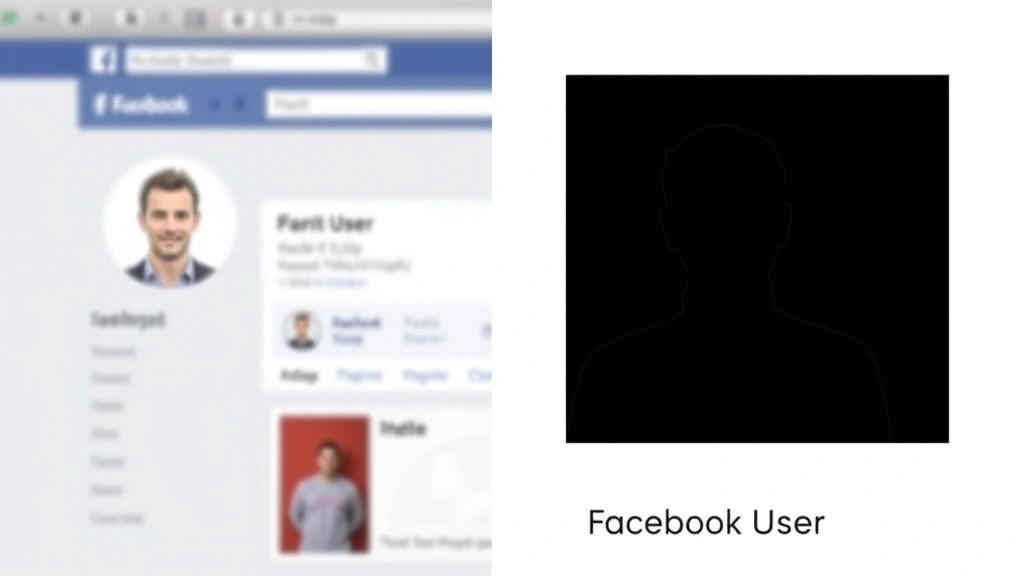
- Their name might appear as “Facebook User” instead of their actual name
- Their profile picture disappears (you’ll see a generic silhouette instead)
- You can’t click on their name to visit their profile
- The message thread is still there, but it’s essentially frozen in time
This is actually one of the more reliable indicators because it’s hard to fake. If someone blocked you, Facebook retroactively changes how their old messages display to you.
However—and this is important—this can also happen if they deactivated their account. So again, this isn’t a smoking gun by itself. You need corroborating evidence.
Try Sending Them a Message
Open your Messenger app or go to Facebook’s Messenger section. Search for their name and try to send them a message. Here’s what happens in different scenarios:
If they blocked you:
- You might be able to type a message, but it won’t send. You’ll see an error message or the message will stay in “pending” status forever
- Or you won’t be able to find them in Messenger at all
- If you try to message them from a comment thread, you’ll get a notification that you can’t message this person
If they didn’t block you but just aren’t responding:
- Your message sends normally and shows as “sent”
- It might show as “delivered” or “read” depending on their settings
The tricky part: Facebook’s messaging system is inconsistent. Sometimes a pending message just means they have strict message filters on. So don’t read too much into a single failed send attempt. But if you try multiple times over days and nothing ever goes through, that’s more telling.
Safety Note: Don’t spam someone with messages trying to test if they blocked you. That’s not cool and could escalate things. One or two attempts is enough to gather data.
Check Your Tag History
This is a lesser-known method, but it works. If someone blocked you, you won’t be able to see any posts they’ve tagged you in, and you won’t be able to view your own posts that they’ve commented on (from their perspective).
Here’s how to check:
- Go to your own profile
- Click on “Photos” or “Posts”
- Look for posts or photos where you remember them commenting or tagging you
- Try to view those posts
If the post exists but their comments or tags have vanished, and you know they were there before, that’s another clue. But again—deactivation can create the same effect, so this is supporting evidence, not proof.
A cleaner test: if you remember a post they made that tagged you, try to find it. If you can’t locate it anywhere, and you know it existed, blocking is likely.
Ask a Mutual Friend (or Them)
Sometimes the direct approach is best. If you have a mutual friend, you could casually ask, “Hey, have you seen [person] around? I can’t find their profile.” This is low-key and doesn’t accuse anyone of anything.
If the mutual friend confirms they’re still active and posting, well, that narrows it down.
As for asking the person directly—that depends on your relationship and the situation. If you’re on okay terms, a simple message through another platform (text, email, Instagram) like “Hey, I noticed I can’t find your Facebook profile—did you deactivate?” can work. It’s honest and gives them an out if they did block you intentionally.
Most people will be straightforward if you ask directly and non-accusingly. Some will ghost you. That tells you something too.
Block vs. Deactivation vs. Unfriend
This is crucial because the symptoms overlap. Let’s break down what each action actually does:
Blocked by someone:
- You can’t see their profile, posts, or friends list
- You can’t message them (or messages stay pending)
- You can’t search for them (usually)
- Old messages show their name as “Facebook User”
- They can still see your public posts (unless you’ve restricted them)
- You can’t tag them or see tags they made of you
They deactivated their account:
- Their profile is invisible to everyone, not just you
- Their posts disappear from your feed
- Old messages show “Facebook User” (same as blocking)
- Their name might not appear in mutual friend lists
- You can’t message them
- But if they reactivate, everything comes back
They unfriended you (but didn’t block):
- You can still see their profile (if it’s public)
- You can see some of their posts (depending on privacy settings)
- You can’t message them unless they allow messages from non-friends
- Old messages are still there and readable
- You can still search for them
The key difference: a block is personal and directed at you. Deactivation affects everyone. If their profile is gone but mutual friends still see them active, you’re blocked. If nobody can see them, they probably deactivated.
Frequently Asked Questions
Can someone block me on Facebook without me knowing?
– Yes, absolutely. Facebook doesn’t notify you when someone blocks you. You have to discover it yourself through the methods above. There’s no “You’ve been blocked” notification, which is both good (less embarrassing) and bad (you might not know for a while).
If I’m blocked, can I still see their old posts I commented on?
– No. Once you’re blocked, you lose access to their profile entirely, including old posts. However, if the post is on someone else’s timeline and they didn’t block you, you might still see it there—but you won’t see the blocked person’s comments on it.
Does blocking someone delete our message history?
– Not for you. Your message thread stays in your inbox, but their profile info gets hidden (shows as “Facebook User”). For them, blocking deletes the message thread entirely from their inbox.
Can I tell if someone temporarily blocked me and then unblocked me?
– Not directly. Facebook doesn’t log or notify you about blocks and unblocks. But if their profile suddenly reappears after being gone, they either unblocked you or deactivated and reactivated. You can’t know which without asking.
What if I search for them and nothing comes up—does that mean I’m blocked?
– Not necessarily. It could mean they deactivated, changed their name, set their profile to private, or adjusted their search visibility settings. Use the other methods (mutual friends, old messages) to confirm.
If I’m blocked, can they still see my public posts?
– Yes. Blocking is one-way. They can’t see your profile or message you, but they can still see anything you’ve made public. If you want to hide from them completely, you’d need to restrict them or change your privacy settings.
How do I get unblocked on Facebook?
– You can’t unblock yourself. The person who blocked you has to unblock you. You could reach out through another platform and ask, but there’s no technical workaround. If it was a misunderstanding, a genuine apology and explanation sometimes works.
Is there a way to block someone back if they blocked me first?
– You can block them, but since they already blocked you, it doesn’t change anything from a practical standpoint. You already can’t see each other. Blocking them is more about making a statement or ensuring they can’t unblock and contact you later.
Can I see if someone blocked me on Facebook through a different device or account?
– If you have another Facebook account, you could search for them from that account. If they appear in your search on the second account but not your primary, they’ve blocked your primary account specifically. This is a useful troubleshooting step, but obviously, don’t use it to harass someone.
What should I do if I’ve been blocked?
– Respect it. If someone blocked you, they’ve made a choice about their boundaries. Trying to contact them through other means or creating a new account to message them is harassment. If you want to repair the relationship, reach out once through another platform (text, email) with a genuine apology, then let it go. If they want to unblock you, they will.
The Bottom Line
Figuring out how to know if someone facebook blocked you requires combining multiple checks because Facebook intentionally makes it ambiguous. Use the search method, check through mutual friends, review old messages, and try messaging. If most of these point the same direction, you’ve got your answer.
Getting blocked sucks, but it’s also a form of communication. Someone’s telling you—without words—that they need space from you. That’s hard to accept, but it’s their right. Your job is to respect that boundary and move forward.
For broader social media privacy concerns, you might want to review how to manage your digital footprint across platforms. Understanding privacy settings across Facebook, Instagram, and other networks helps you protect yourself too.
If you’re interested in the flip side—how to block people yourself—check out our guide on how to block YouTube channels for similar privacy management strategies. And if you’re managing a Facebook page professionally, understanding how to add admin to Facebook page helps you control who has access to your account.
For those managing multiple social platforms, how to hide followers on Instagram offers similar privacy controls on sister platforms. And if someone’s blocked you on messaging apps too, our guide on how to unblock a number on iPhone walks through unblocking on other devices.
According to This Old House’s privacy resources, managing your digital relationships requires the same intentionality you’d use in physical relationships. Set boundaries, respect others’ boundaries, and move on when needed.
One more thing: if you’re being harassed or stalked, and someone’s blocking isn’t enough, OSHA and similar authorities provide resources on documenting digital harassment. Don’t suffer in silence.


